
BeautyPlus vs Adobe: Choosing the best AI photo enhancer for your workflow
The digital landscape is currently flooded with tools that promise to turn a blurry snapshot into a professional masterpiece with a single click.
BeautyPlus vs Adobe: Choosing the best AI photo enhancer for your workflow
The digital landscape is currently flooded with tools that promise to turn a blurry snapshot into a professional masterpiece with a single click.
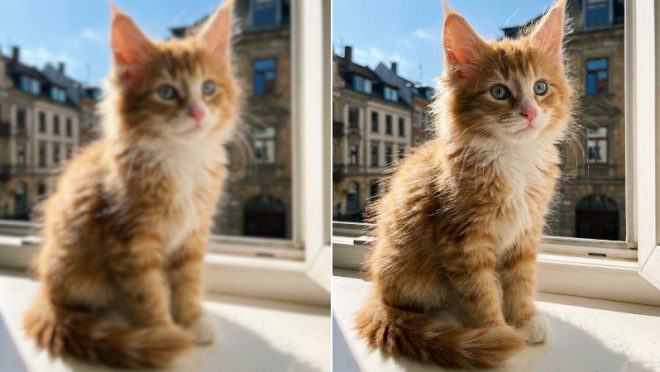
Among the titans of this industry, BeautyPlus and Adobe Express stand out as the most famous photo enhancer online tool options available today.
While both leverage cutting-edge artificial intelligence to upscale images, deciding which one deserves a spot in your creative tech stack depends entirely on your specific editing goals.
The power of BeautyPlus photo enhancer
BeautyPlus has evolved from a simple retouching app into a powerhouse of visual refinement. Its image enhancer is specifically engineered to breathe life into low-resolution files, making it a favourite for social media creators who need instant, high-impact results.
When you utilise the photo enhancer, the system employs sophisticated AI models to intelligently reconstruct lost pixels, ensuring that textures like skin or fabric look natural rather than “over-processed.” The platform also offers a versatile tool like the photo booth that allows for rapid photo editing.
Key features
- Specialised AI modes: Users can toggle between “Ultra HD” for portraits and “AI Ultra HD” for landscapes and products, allowing the algorithm to prioritize the right details.
- Pro-level data security: Built with Privacy-by-Design, it adheres to GDPR and CCPA standards, utilising SSL/TLS encryption to ensure your creative assets are never used for unauthorised AI training.
- Batch processing efficiency: The web-based tool can handle up to 50 images simultaneously, significantly cutting down the time spent on repetitive quality fixes.
Exploring the Adobe Express photo enhancer
Adobe Express serves as the accessible gateway to the Adobe ecosystem, offering a streamlined version of the high-end technology found in Photoshop. It is designed for users who want a balance between quick AI fixes and broader graphic design capabilities within a single browser tab.
Adobe’s tool focuses on “one-click” simplicity, allowing users to sharpen images while maintaining a clean, professional aesthetic. It is deeply integrated with the Adobe Stock library, making it a strategic choice for those already working within the Creative Cloud environment.
Key features
- Seamless ecosystem integration: Easily move enhanced photos into design templates for flyers, social posts, or logos without leaving the platform.
- Generative AI quick actions: Beyond basic sharpening, it offers powerful background removal and object insertion powered by Adobe Firefly.
- Professional typography and assets: Access to thousands of licensed Adobe Fonts and stock elements to complement your enhanced visuals.
Comparing performance and value
Effectance and output quality
BeautyPlus excels in facial restoration and texture preservation, making it superior for portraits and “beautification” tasks. Adobe Express, conversely, provides a more conservative and “realistic” enhancement that is ideal for corporate presentations and clean, minimalist designs.
The learning curve
BeautyPlus offers a “one-button” philosophy that requires zero technical knowledge, making it incredibly approachable for casual users. Adobe Express is also beginner-friendly, though its interface is slightly more complex due to the inclusion of design layers and professional layout tools.
Pricing models
Adobe Express primarily operates on a standard monthly or yearly subscription, which can be a commitment for occasional users. BeautyPlus offers a hyper-flexible approach with multi-tiered subscriptions and a “Pay-As-You-Go” credit system, allowing you to buy exactly what you need without a recurring bill.
Which tool fits your style?
BeautyPlus is best for
This tool is the ultimate choice for influencers and content creators who prioritise aesthetic perfection and speed. If you need to turn a dimly lit mobile photo into a crisp, high-quality post in seconds, its specialised portrait AI is unbeatable.
Adobe is best for
Adobe Express is the better fit for small business owners and marketers who need to create branded collateral. It shines when you need to enhance a photo and then immediately wrap it in a professional layout with high-quality typography.
Conclusion
Ultimately, the battle between BeautyPlus and Adobe comes down to your end goal. If your priority is rapid, high-fidelity AI enhancement with a budget-friendly credit system, BeautyPlus is the clear winner. However, if you are looking for a comprehensive design suite that includes basic photo sharpening, Adobe Express remains a formidable contender.