
E Ink notebooks: Putting handwriting on a digital page
For those who still love putting pen to paper in the digital age, these five E Ink devices let you write, sketch, annotate documents and keep your notes together without giving up the familiar act of using a pen.
E Ink notebooks: Putting handwriting on a digital page
For those who still love putting pen to paper in the digital age, these five E Ink devices let you write, sketch, annotate documents and keep your notes together without giving up the familiar act of using a pen.
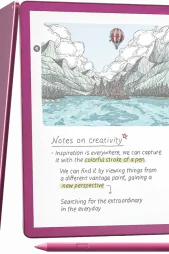
For those who still love putting pen to paper in the digital age, these five E Ink devices let you write, sketch, annotate documents and keep your notes together without giving up the familiar act of using a pen.


There is something about writing things down that typing on a laptop never quite manages to replace. Maybe it is the satisfaction of crossing something off a to-do list, scribbling in the margins during class or opening a fresh page when you are trying to organise your thoughts.
The problem begins when one notebook becomes three, loose sheets start disappearing into bags and the one page you actually need is somehow always at home.
E Ink notebooks offer an interesting middle ground.
Unlike the bright, constantly buzzing screens we spend most of the day looking at, these devices are designed to feel closer to paper. You can write, sketch, annotate documents and keep pages of notes together without giving up the familiar act of using a pen.
Here are five E Ink devices that can bring handwritten notes into a more digital space.
reMarkable Paper Pro
For people who like writing by hand but want to keep their notes in one place, the reMarkable Paper Pro offers a digital alternative to carrying several notebooks.
The device has an 11.8-inch colour E Ink display that can be used for handwritten notes, reading, sketching and working with documents. The Marker allows users to write directly on the screen, while palm rejection makes it possible to rest a hand on the display while writing.
The colour screen also makes it easier to organise information on a page. Different colours can be used for headings, highlighting important sections or marking documents, adding some of the flexibility of pens and highlighters to a digital notebook.
There is also an adjustable reading light for writing or reading in lower-light settings, while 64GB of storage provides room for notebooks and documents.
For students or professionals who regularly take handwritten notes, the Paper Pro can keep different notebooks, reading material and quick ideas together without moving completely away from the experience of writing on paper.
WHERE TO BUY: STAR TECH
PRICE: TK125,000
Supernote A5 X2 Manta
Not every E Ink device needs to work like a tablet. The Supernote A5 X2 Manta focuses more closely on the part many people are looking for: writing by hand.
Its 10.7-inch flexible E Ink display provides a large surface for taking notes, making lists, planning or writing for longer periods. The device is designed around handwriting and organising notes rather than adding the entertainment features found on conventional tablets.
This can be particularly useful for people who regularly fill several notebooks. Instead of keeping lecture notes, meeting notes and everyday lists in separate places, different pages and notebooks can be stored on the same device.
The Manta also has a relatively slim design, making it easier to carry between classes, meetings or other places where a notebook would normally be needed.
For people who already prefer taking notes by hand and simply want an easier way to organise them, the Manta keeps the experience relatively straightforward. It replaces the pile of notebooks without trying to replace every other device at the same time.
WHERE TO BUY: MULTIMEDIA KINGDOM
PRICE: TK68,999
BOOX Note Air5 C
For those who want an E Ink notebook to do more than hold handwritten notes, the BOOX Note Air5 C adds some of the flexibility of a regular tablet.
The device has a 10.3-inch colour E Ink display that can be used for writing, reading and annotating documents. Stylus support allows users to take handwritten notes directly on the screen, while colour can be used to highlight information or separate different parts of a page.
One of its more noticeable differences is Android. This allows the Note Air5 C to work with compatible apps instead of limiting users to the functions included with the device.
That can be useful for students or professionals whose work is already spread across different digital platforms. Reading material, handwritten notes and compatible productivity apps can be accessed from the same device without moving back to a conventional tablet for every task.
For people who want the paper-like display of E Ink but need more than a dedicated digital notebook, the Note Air5 C provides a more flexible option for everyday work and study.
WHERE TO BUY: DIAMU
PRICE: TK79,900
Amazon Kindle Scribe Colorsoft
For years, a Kindle solved the problem of carrying several books around, but the Kindle Scribe Colorsoft is designed to make writing a larger part of the experience.
Its 11-inch colour display can be used for reading books and documents as well as keeping handwritten notes with the included Premium Pen. Users can write in the built-in notebook, work with documents and use colour when highlighting information.
The larger screen also gives users more room than a standard e-reader when working with notes or documents. For students, this can be useful when reading study material and writing down information without having to keep a separate notebook beside them.
Colour highlighting adds another practical feature. Different colours can be used to mark passages or separate information, making it easier to return to important sections later.
For people who already spend a lot of time reading digitally, the Scribe Colorsoft brings reading and note-taking onto the same device. Instead of carrying an e-reader, notebook and highlighters separately, much of the same routine can be kept together.
WHERE TO BUY: UBUY BANGLADESH
PRICE: TK105,993
Kobo Elipsa 2E
For people who regularly take notes while reading, the Kobo Elipsa 2E combines both activities on a larger E Ink screen.
The device has a 10.3-inch touchscreen and comes with the Kobo Stylus 2, which can be used to write, highlight and add notes directly on the display. Its larger size provides more room for working with documents than a conventional e-reader while still keeping the screen paper-like.
The Elipsa 2E also includes 32GB of storage for keeping books, documents and notebooks together. ComfortLight PRO allows users to adjust the brightness and colour temperature of the display, which can be useful during longer reading or writing sessions.
Having the stylus also makes it easier to interact with reading material in a way that feels closer to working with a printed page. Passages can be highlighted and notes can be added without reaching for a separate notebook.
For students, regular readers or anyone who tends to write while they read, the Elipsa 2E offers a straightforward way to keep books, documents and handwritten notes on one device.
WHERE TO BUY: UBUY BANGLADESH
PRICE: TK63,118